

Trigger automations based on roles
When you send automations customized by people's roles, you'll have a better chance of motivating them to take action than if you sent generic messages to everyone.
Method
Determine how you’re storing data in Customer.io. This will determine the type of automation you should make.
- Are you storing role information on people as attributes
A key-value pair that you associate with a person or an object—like a person's name, the date they were created in your workspace, or a company's billing date etc. Use attributes to target people and personalize messages.
? - Or are you storing role information on profiless’ relationships
The connection between an object and a person in your workspace. For instance, if you have Account objects, people could have relationships to an Account if they're admins.
to objectsAn object is a non-person entity that you can associate with one or more people—like a company, account, or online course.
(like Accounts, Companies, Courses)?
Role stored as profile attribute
Build a segment
If you store role data as attributes, you can create a segment to trigger an automation for people who belong to it.
- Go to Segments.
- Click Create segment.
- Name your segment so it’s easy to find later - like “Marketing role.”
- Choose Data-driven segment.
- Add an attribute condition. In this example, the role is stored as this attribute
person_employment_role.
.png)
If you have similar roles, you might include them all in one segment. For instance, maybe you have “marketing_manager” and “product_marketer” and people with any of these roles should receive the same messaging. Change the top condition to “Any of the following conditions match” and include all roles in the segment.
Create a segment-triggered automation
Now you can use your role-based segment as a trigger for an automation.
Start by creating an automation and choose Segment change as the trigger type. Select the segment you made above:
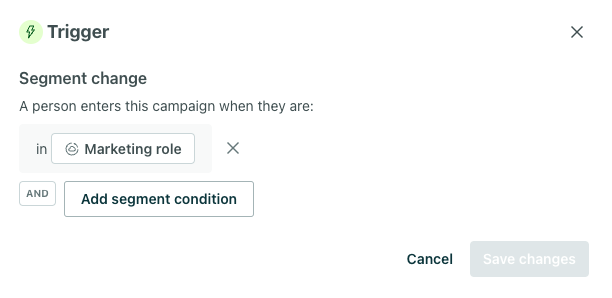
Only users with marketing roles will enter this automation, so you can customize your content for this specific audience. If your segment includes people with multiple kinds of marketing roles, you can personalize messaging further with liquid conditionals or action conditions based on specific roles.
Role stored as relationship attribute
If you’re storing role data on a relationship to an object, you can use the relationship attribute to trigger automations. For example, if you have Account objects in your workspace, you could trigger an automation based on the creation of an account and filter the audience to people who are admins of the account. You could also trigger an automation when someone becomes an admin on the account.
For instance, maybe you want to nurture admins of accounts to encourage them to upgrade their account. Checkout our recipe on upselling power users to begin.
Wrap Up
Role based messaging is an ideal way to increase engagement by only showing people content relevant to them. Customization based on role is only the beginning! Consider tailoring your messaging based on location, interests, or even company size to create more engaging emails.
If you have questions about how to apply this to your business, we’re here to answer!