

Why aren't people receiving my message?
Start here to figure out why people aren't receiving messages at the right time.
Note that people who are unsubscribed from topics or from all messages can still trigger an automation; they just won’t receive messages from that automation.
Check your message’s settings
Select the message block to get started.
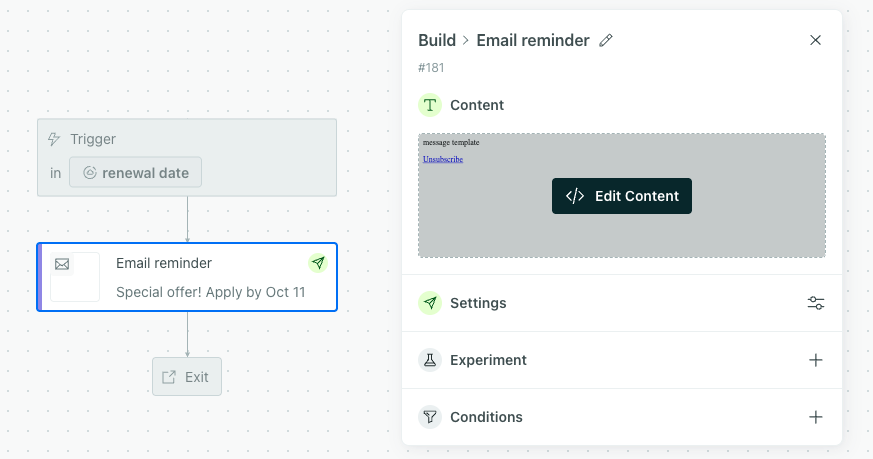
Check your message’s sending behavior
Select Settings to check your message’s sending behavior.
By default, messages are set to queue as drafts in your automations. Update them to send automatically then send any drafts manually to ensure all of your automation’s audience receives the messages.
Check the subscription preference and message limit
Select Settings to check your message’s subscription preferences and message limit settings. By default, they inherit your automation’s settings, but it’s possible to override them.
- Is the person subscribed to receive this message?
- Has the person reached the message limit? If so, they won’t receive this message. This message would be marked as “Undeliverable”.
If the message inherits the automation-level settings, click the automation title and view Messages to see which subscription preference was assigned and what message limit is in place.
Check whether the message is a holdout test
Select Experiment. If “Make this message a holdout test” is selected, then people won’t receive the message.
Check message conditions
You can add action conditions to a message to limit who receives it. If a person doesn’t meet the action conditions, they won’t receive the message and will move onto the next item in your workflow. The person’s journey for the automation will show they skipped the message.

Check if the message failed to send
If the message has a status of “Failed”, then you might have a liquid error. Check the message content to see if any errors are present.
Check if the email address is suppressed
A suppressed email won’t receive emails from Customer.io. If you manage email deliveries through Customer.io, check your suppression list in > Workspace Settings > Email > Suppression List.