Review your email for quality and accessibility
BetaThis feature is new and we're actively working on it. UpdatedUse the Review panel to quickly pinpoint errors that could prevent your email from sending, and get tips for improving the quality of your message.
How it works
The Review panel validates your liquid syntax, links, images, and accessibility. It also shows you a SpamAssassin score so you know how likely inboxes are to filter it out as spam.
Click Review at the top of the editor to see a summary of the email’s quality and accessibility:
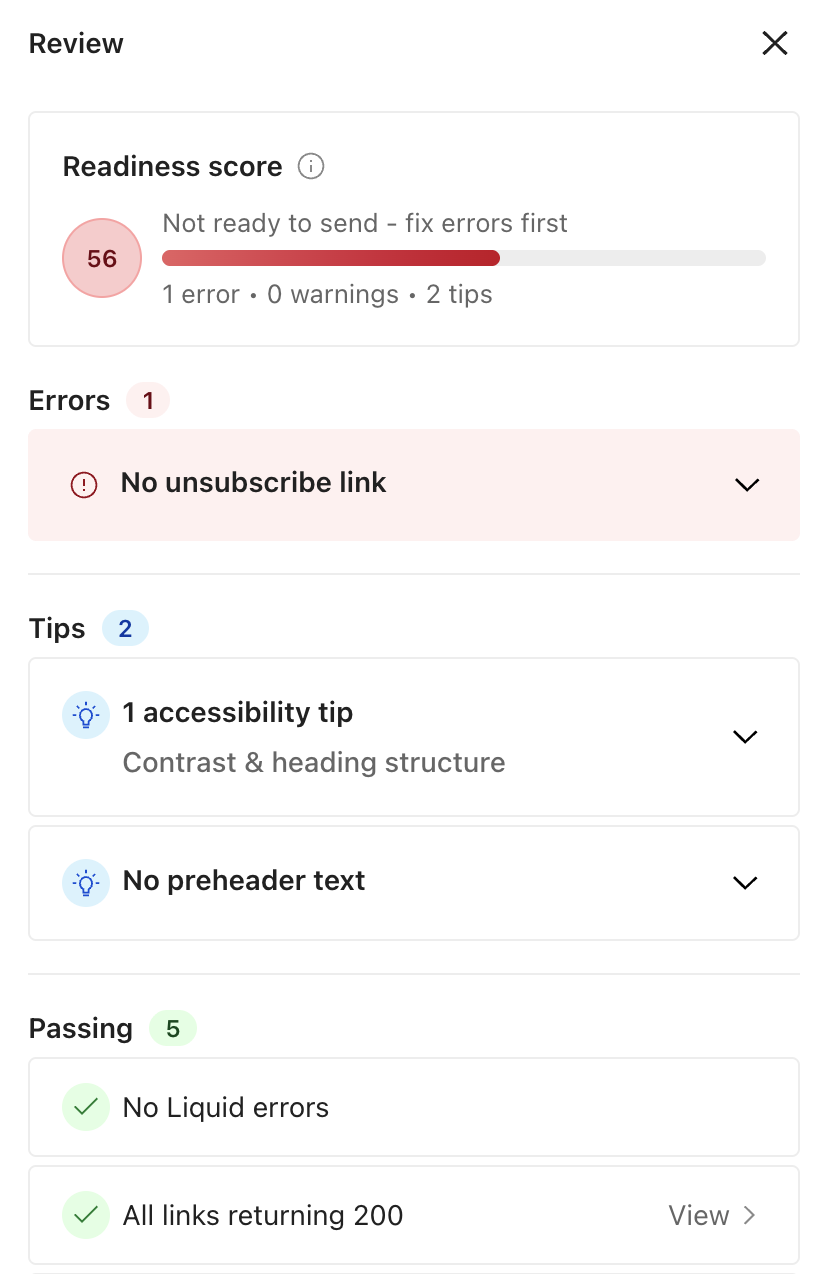
In the panel, you first see a Readiness score, which is a 0-100 score that helps you understand if your email is ready to send. The score is a sum of the errors, warnings, and tips surfaced in the rest of the panel.
The panel is either red, yellow, or green, depending on the issues found, not the score itself. The score (0–100) reflects overall email quality and rises as you resolve errors and apply suggested improvements.
- Red: An error could cause your email to fail to send or cause a compliance issue. Fix it before sending.
- Yellow: Review these items to improve the quality of your email.
- Green: Your email is ready to send.
Learn more about previewing your message after making changes in the visual editor.
Fix errors before sending
It’s best practice to fix all errors before sending your email to make sure it’s compliant and sends successfully to your recipients.
These are the errors you might encounter:
- Issue with liquid syntax—the message won’t render correctly
- No unsubscribe link—compliance risk
Make sure you add fallback values to your liquid and preview your message with multiple profiles to see how your message renders.
From the visual editor, turn on Preview to check how liquid renders in your message.