Upgrade from 3.x to 4.0.0
UpdatedVersion 4.0.0 of the Customer.io Flutter SDK adds Swift Package Manager (SPM) support for iOS.
What changed?
Version 4.0.0 of the Flutter SDK adds Swift Package Manager (SPM) support as an alternative iOS dependency manager. SPM is Apple’s built-in package manager with native Xcode integration, so you don’t need to manage a separate Podfile for Customer.io dependencies. When SPM is enabled, the SDK is automatically resolved - no manual Xcode package setup needed for the main app.
CocoaPods continues to work. If you want to stay on CocoaPods, you don’t need to change anything.
Upgrade process
Update to version 4.0.0 or later of the Customer.io Flutter SDK in your pubspec.yaml:
dependencies:
  customer_io: ^4.0.0
If you use CocoaPods (no changes needed)
If you want to continue using CocoaPods, you don’t need to change anything. Your existing Podfile will continue to work. Just update the SDK version above and run pod install --repo-update --project-directory=ios.
If you want to switch to SPM
Requirements
- Flutter 3.24+
- Xcode 16.0+
firebase_core: ^3.5.0or higher (we recommend at least^4.6.0)firebase_messaging: ^15.2.0or higher (we recommend at least^16.1.3)
Older versions of firebase_core and firebase_messaging don’t support SPM and cause module conflicts.
Steps
Update Firebase dependencies in your
pubspec.yamlto SPM-compatible versions:dependencies: firebase_core: ^3.5.0 # we recommend at least ^4.6.0 firebase_messaging: ^15.2.0 # we recommend at least ^16.1.3Enable SPM (if not already enabled). If you haven’t enabled Swift Package Manager in your Flutter project, you can do so globally or per-project:
Global: Run
flutter config --enable-swift-package-managerPer-project: Add the following to your
pubspec.yaml:flutter: config: enable-swift-package-manager: true
Remove CIO pod lines and the NSE target from your Podfile. Remove any
customer_iopod lines and theNotificationServiceExtensiontarget block:pod 'customer_io/fcm', :path => ... pod 'customer_io/location', :path => ... pod 'customer_io_richpush/fcm', :path => ...With SPM enabled, Flutter’s pod helper automatically skips SPM-handled plugins. The core SDK, in-app messaging, and push notifications modules (
DataPipelines,MessagingInApp,MessagingPushFCM) are automatically included via SPM - no additional setup needed.Using the Location module?
If you use the Location module, make surecustomerio_location_enabled=trueis set in yourandroid/gradle.properties. This flag controls Location inclusion on both Android and iOS when using SPM. If the flag can’t be read (e.g. in add-to-app modules or some CI setups), you can use theCIO_LOCATIONenvironment variable as a fallback:CIO_LOCATION=true flutter build ios. See Location tracking for details.Remove the old CocoaPods framework from the NSE target in Xcode. Go to your NotificationServiceExtension target > General > Frameworks, Libraries, and Embedded Content and remove
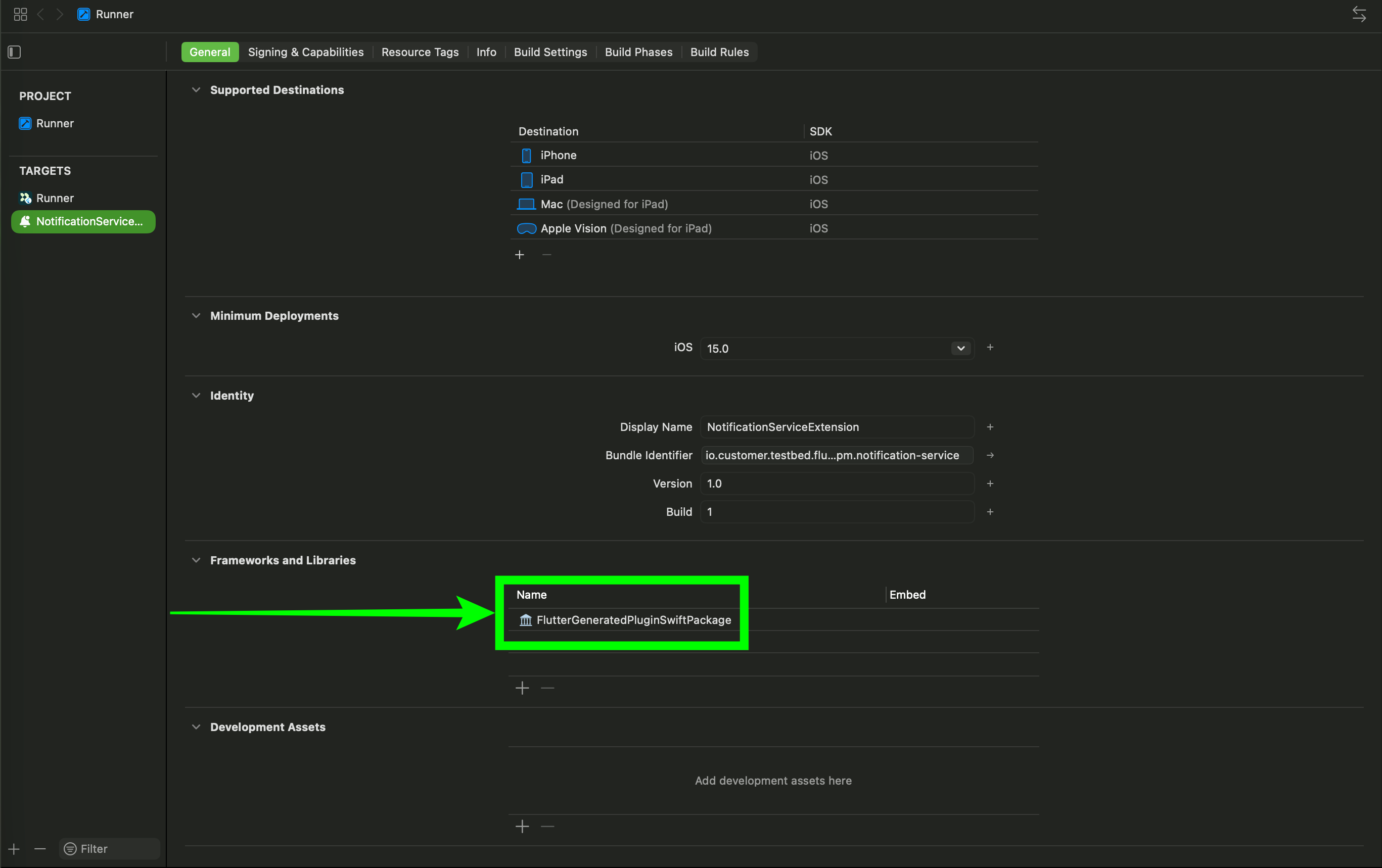
Pods_NotificationServiceExtension.framework.Add the SPM framework to the NSE target. In the same Frameworks and Libraries section, click + and add FlutterGeneratedPluginSwiftPackage.
Add
import UserNotificationsto the top of yourNotificationService.swift:import CioMessagingPushFCM import UserNotificationsSPM doesn’t transitively import system frameworks like CocoaPods does, so you must add the import.
Clean and rebuild:
cd ios && rm -rf Pods Podfile.lock
cd .. && flutter clean && flutter pub get
flutter build ios
Troubleshooting
If you run into issues during migration, see SPM troubleshooting for solutions to common problems like module conflicts, deployment target errors, and CI build failures.