Notification inbox
UpdatedHow it works
Unlike other messages, inbox messages don’t necessarily appear immediately to users, and they don’t disappear when the user dismisses them. Instead, you’ll display these messages through a notification inbox that your audience can access at their leisure.
Customer.io also doesn’t deliver rendered inbox messages; they’re delivered as JSON payloads. The SDK helps you listen for these payloads, but you’ll determine how to display them in your own inbox client.
You can send an inbox message as a part of a campaign, broadcast, or transactional message.
This feature requires cdp-analytics-browser version 0.3.11 or later
@customerio/cdp-analytics-browser), you need to update to version 0.3.11 or later to use the notification inbox.Inbox methods
You’ll fetch messages using the inbox() method.
| Method | Description |
|---|---|
inbox() | Fetch messages from the inbox. Takes optional parameters to filter messages by topic. (e.g. analytics.inbox('orders', 'announcements')) |
inbox.messages() | Fetch messages from the inbox. |
inbox.total() | Get the total number of messages in the inbox. |
inbox.totalUnopened() | Get the number of unopened messages in the inbox. |
inbox.markOpened() | Mark a message as opened. |
inbox.markUnopened() | Mark a message as unopened. |
inbox.markDeleted() | Mark a message as deleted. |
inbox.trackClick(actionName?) | Track a click on the message. |
Inbox message payloads
Inbox messages are delivered as a JSON payload. The SDK helps you listen for the payload, but you’ll render the content in your own inbox client.
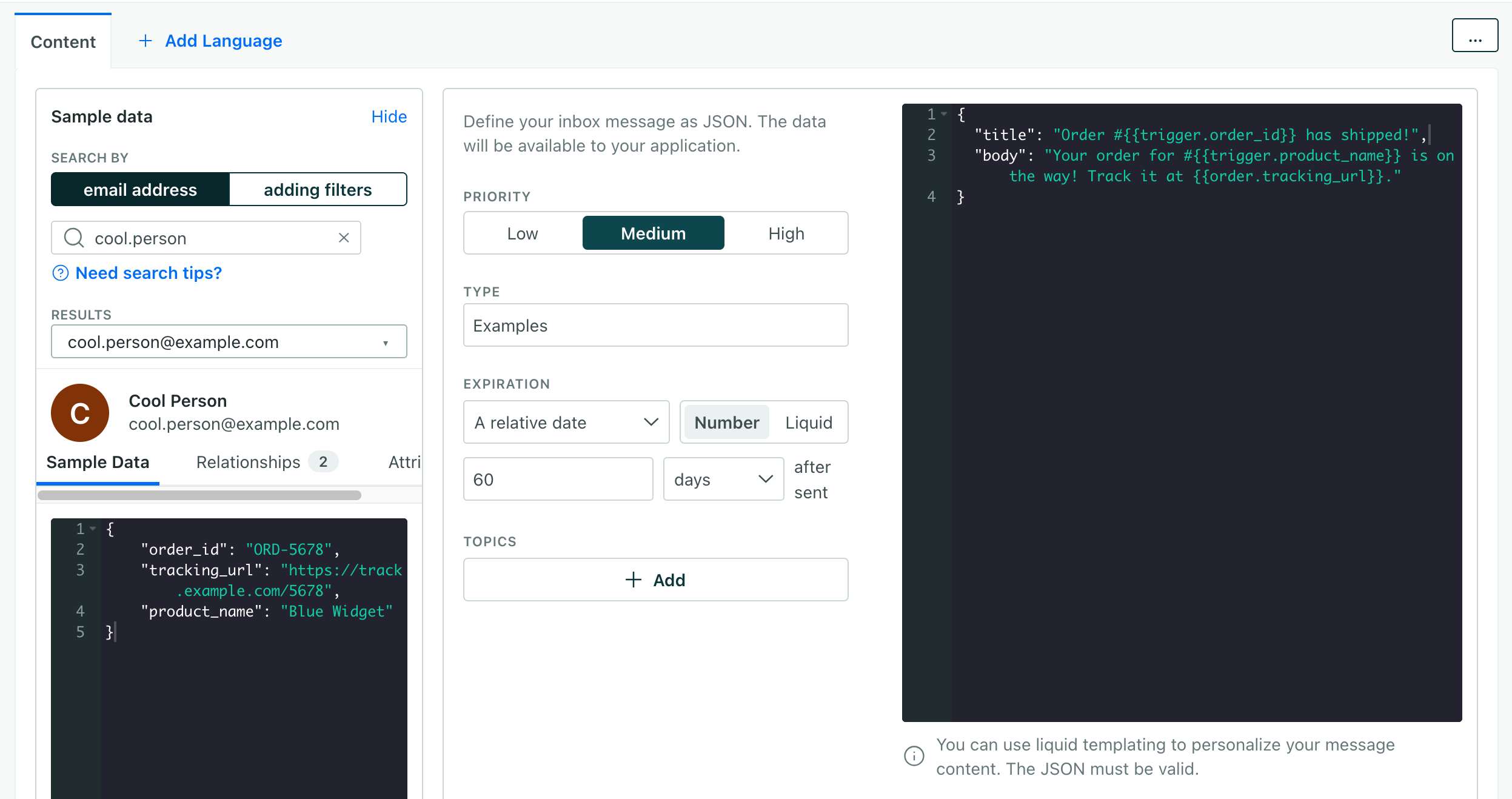
The client payload includes the following fields, but you’re most concerned with the properties object, which represents your message content. By default, we’ll send a title and body field, but you can add other fields like an image or a link—whatever you set up your inbox to expect.
Make sure that your team members know what payloads to send—especially if you expect different payloads for different topics or types of messages.
| Field | Type | Description |
|---|---|---|
messageId | string | Unique identifier for the message. |
sentAt | string | When the message was sent. |
expiresAt | string | When the message will expire. |
opened | boolean | Whether the message has been opened. |
topics | array | The topics that the message belongs to. |
type | string | The type of message. |
properties | object | The properties of the message. |
{
    "messageId": "1234567890",
    "sentAt": "2026-02-05T12:00:00Z",
    "expiresAt": "2026-02-05T12:00:00Z",
    "opened": false,
    "topics": ["orders", "shipping"],
    "type": "order_shipped",
    "properties": {
        "title": "Hey Cool Person, your order shipped!",
        "body": "You can track your order #1234567890 here:",
        "link": "https://example.com/orders/1234567890"
    }
}
Inbox topics and types
When you send an inbox message, you can assign it to one or more topics. You can use these topics to filter messages when you call the inbox() method. You can also use the topics to determine how to render the messages in your notification inbox.
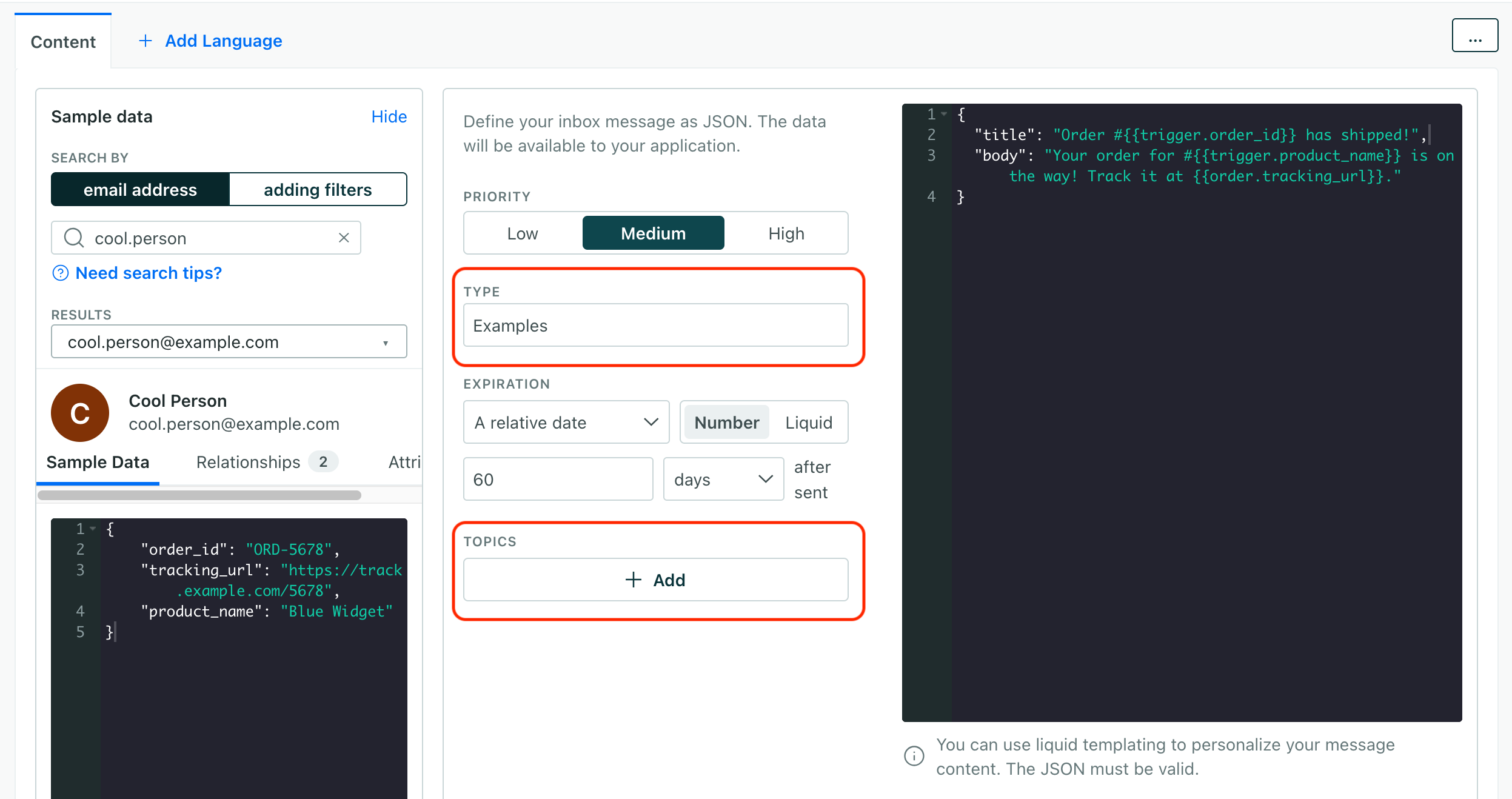
Messages also have a type. Think of this like a sub-category or topic for a message. For example, you might have orders and sale topics, where orders don’t have images but sale topics might. Or, within the orders topic, you might have order_placed and order_shipped types, where order_placed lists order details and images of purchased products and order_shipped provides a link to the tracking information for the order that opens in a new tab.
Setup your notification inbox
Again, inbox messages are just JSON payloads. You’ll need to build your own inbox client to display the messages. The code below gives you a starting point, but you can build your own inbox client however you want.
Get Messages
// Get all messages
const messages = await inbox.messages();

// Get counts
const total = await inbox.total();
const unopened = await inbox.totalUnopened();

// Subscribe to updates
const unsubscribe = inbox.onUpdates((messages) => {
  console.log('Inbox updated!', messages);
  // Update your UI
});
Notification inbox code example
Here’s a simple example for an inbox UI. This example assumes you’ve already set up your backend to trigger inbox messages and you’ve already loaded the Customer.io JavaScript SDK.
// Cache messages and inbox instance to avoid re-fetching in each handler.
// Alternatively, you could call inbox.messages() in handlers for simpler code
// at the cost of an extra async call on each button click.
let currentMessages = [];
let inboxInstance;

// Helper to escape HTML and prevent XSS
function escapeHtml(text) {
  const div = document.createElement('div');
  div.textContent = text;
  return div.innerHTML;
}

// Render function
function renderInbox(messages) {
  currentMessages = messages; // Store for handlers
  const container = document.getElementById('inbox');

  container.innerHTML = messages.map(message => {
    const props = message.properties;
    return `
      <div class="inbox-message ${message.opened ? '' : 'unread'}">
        <div class="inbox-message-content">
          <h4>${escapeHtml(props.title)}</h4>
          <p>${escapeHtml(props.body)}</p>
          <small>${new Date(message.sentAt).toLocaleDateString()}</small>
        </div>
        <button onclick="handleRead('${message.messageId}', ${message.opened})">
          ${message.opened ? 'Mark Unread' : 'Mark Read'}
        </button>
        <button onclick="handleDelete('${message.messageId}')">Delete</button>
      </div>
    `;
  }).join('');
}

// Update the unread badge
async function updateBadge() {
  if (inboxInstance) {
    const count = await inboxInstance.totalUnopened();
    document.getElementById('unread-badge').textContent = count;
  }
}

// Wait for analytics to be ready, then initialize inbox and load messages
cioanalytics.ready(() => {
  inboxInstance = cioanalytics.inbox('orders', 'announcements');

  inboxInstance.messages().then(renderInbox);
  inboxInstance.onUpdates(renderInbox);

  // Update unread badge
  updateBadge();
});

// Message actions
async function handleRead(messageId, isOpened) {
  const message = currentMessages.find(m => m.messageId === messageId);
  if (message) {
    isOpened ? await message.markUnopened() : await message.markOpened();
    await updateBadge();
  }
}

async function handleDelete(messageId) {
  const message = currentMessages.find(m => m.messageId === messageId);
  if (message) {
    await message.markDeleted();
    await updateBadge();
  }
}